Sign Up with Epic Games

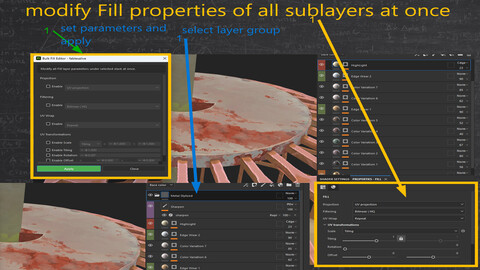
Substance Painter Lack: There's no built-in way to select all sub fill layers and bulk-edit their parameters at once—like you can in Photoshop. This addon bridges that gap in Adobe Substance Painter's functionality.
Batch editing tool for Fill layer parameters in Adobe Substance Painter.
Modify Fill Parameters (eg Projection type,tiling...) of all sub layers at once.
This plugin was developed for Substance Painter 11.0.3 will work all future version but not for work with older versions.
CAUTION: Before you buy: If you're not sure, ask us questions first, watch the video tutorials, and read the documentation. Don't panic in the first few minutes because you can't figure it out immediately and then demand a refund—I'll have to decline it. The last thing I want is for you to hit "refund" later claiming it "doesn't work for you" or "this isn't what I wanted." If you're uncertain, just don't purchase; there are no refunds for second thoughts.
We design these plugins primarily for our own needs, and we're delighted to share them so that others can benefit from them too—after all, great tools deserve a wider audience. In turn, any revenue we receive from your support is thoughtfully directed toward aiding other developers in their work. Your generous contribution, no matter how small, may not change our fortunes overnight, but it makes a meaningful difference in empowering our creative community. Thank you for being part of that!
Release Notes
updated for substance painter 11.1.2
tested also on 12.1
bugs fixed.
CATEGORIES
Special Offer! Get 10% off when you buy 2 products. Get 15% off when you buy 3 or more products. Applies to all products from this seller only from USD $1.00 to USD $100.00
Standard Use License
USD $11.11
License: Standard License
Stock Assets
For personal use and one commercial project (up to 2,000 sales or 20,000 views).
TutorialsOne copy to be used by a single user.
Installable ToolsOne installation by a single user.
Learn MoreFiles (2)
https://artstn.co/m/x9PJ3
Copied
More by fables alive games
Add a tip for fables alive games
Tips are appreciated, but optional!