Sign Up with Epic Games
Quadify Premium — Region-Aware Mesh Optimization for Blender 4.4+

in Resources


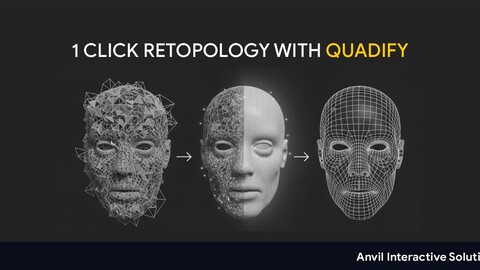
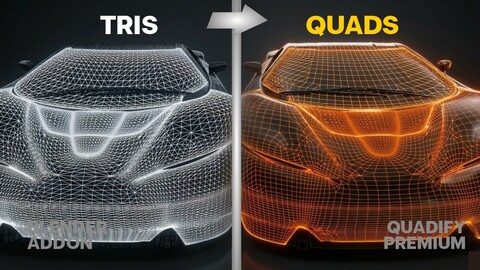
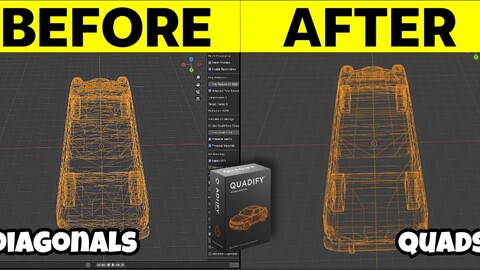
Quadify Premium is a production utility for artists who need fast, controlled mesh optimization across asset libraries, scan data, and marketplace props — without losing what's already good.
It builds on Base with region-aware processing, LOD generation, batch tools, and density targeting. Everything is deterministic and repeatable — the same input produces the same output every time.
Works on:
- Marketplace assets and kit-bash libraries
- Photogrammetry scans (partial conversion, geometry preserved)
- Hard surface meshes with complex material boundaries
- Large prop libraries requiring consistent polygon density
- Mixed tri/quad files from game engines or DCC tools
REGION-BASED CONTROL
Tag faces as Protect, Focus, or Transition directly in Edit Mode. Protect locks an area completely — Quadify won't touch it. Focus applies aggressive conversion. Transition blends between. Auto-tag assigns regions automatically using UV seams, sharp edges, and curvature heuristics so you can start from a reasonable default and adjust from there.
The live region overlay shows Protect / Focus / Transition colours directly in the viewport before you run anything. What you see is what gets processed.
ADAPTIVE CONVERSION ENGINE
Premium automatically detects mesh type — photogrammetry scan, hard surface, or mixed — and adjusts the conversion threshold accordingly. Scans get a permissive threshold that recovers more quads. Hard surface assets get a tight threshold that preserves structural edges. No manual tuning required.
FEATURES
Everything in Base, plus:
- Region-based control — Protect / Focus / Transition face tagging
- Auto-tag regions by UV seams, sharp edges, and curvature
- Density Target — reduce meshes based on world-space tris per m² instead of arbitrary ratios
- LOD generation — Gentle / Balanced / Aggressive profiles with estimated face counts before running
- LOD naming conventions — Unity, Unreal, Simple
- Batch processing across selected objects
- Preset save / load system
- Analytics and JSON report export
- Before / after snapshot with toggle
- Live quad coverage progress bar
- Mesh health check with one-click Fix All
REQUIREMENTS
Blender 4.4 or newer
One-time purchase — no subscription, lifetime updates
ALSO AVAILABLE
Quadify Base ($10) — core conversion engine, essential tools
Quadify Pro ($50) — full studio pipeline, batch folder processing, UV tools, collision proxies, QA reports
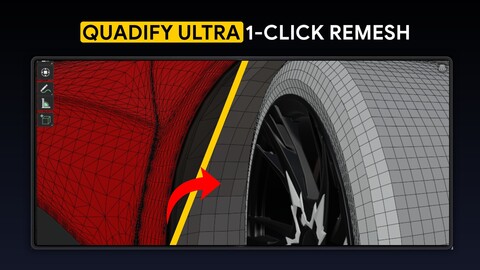
Quadify Ultra ($150) — ML-routed full remesh, 100% quads on any mesh type, Blender 5.0+
Full comparison: quadify3d.com/compare
Also available on Superhive Marketplace.
DOCUMENTATION
quadify3d.com
Release Notes
## v2.8.0 — Rebuild Topology & Conversion Quality
## New Features
- Rebuild Topology — full mesh remesh using the Smooth Remesh modifier. Runs a complete preparation sequence before remeshing: apply all transforms, remove doubles, recalc normals, fill holes, beautify tris, progressive quad conversion passes. Produces clean quad topology following surface curvature. Destructive — UVs, materials and shape keys are intentionally discarded.
- Quad Density selector — dropdown on the Rebuild Topology button: Draft (25%), Medium (50%), Match (same as original), High (2x), Ultra (4x). Controls the octree depth of the smooth remesh.
- Smart Convert — detects mesh type and selects optimal conversion threshold automatically. Scan/AI meshes use a 60° face threshold; hard-surface meshes use the user's angle limit. Shows detected type and threshold used.
- First-run guide — dismissable panel on first session open showing the three key Premium capabilities.
- Multi-select batch banner — alert when multiple objects are selected and batch mode is off.
## Fixes
- Rebuild Topology now applies all transforms before remeshing — fixes empty mesh from unapplied rotation.
- Shape keys removed before any remesh — fixes RuntimeError on modifier apply.
- Mesh Summary refreshes immediately after Rebuild Topology.
- BMEdge.use_edge_sharp AttributeError fixed for Blender 4.1+ — uses getattr with smooth fallback.
- Analysis gate moved to WindowManager — no longer persists across sessions or transfers to copies.
- Semantic mesh classification removed from Premium — was misidentifying vehicle panels.
CATEGORIES
Standard Use License
USD $25.00
License: Standard License
Stock Assets
For personal use and one commercial project (up to 2,000 sales or 20,000 views).
TutorialsOne copy to be used by a single user.
Installable ToolsOne installation by a single user.
Learn MoreFiles (2)
https://artstn.co/m/np2zw
Copied
More by Wilson Anibe

Add a tip for Wilson Anibe
Tips are appreciated, but optional!