Sign Up with Epic Games


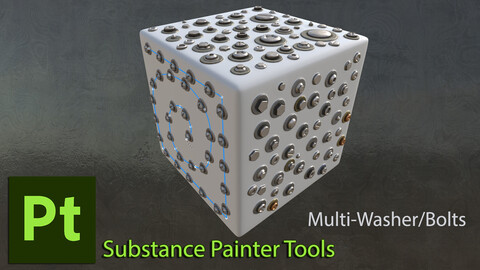
Its a Multi-Material which allows to scatter different types of steel bolts, screws, nuts with different heads with multiple head types such as hex, mushroom, flat, and torque mushroom. Its a full PBR stencil I designed and developed to significantly speed up my own Substance Painter workflows and avoid monster-layer-stacks.
Link to the video about the tool and examples of how to use it:
https://youtu.be/fQccK9oZvZA
Key Features:
- 20 Bolt/Head Variations: Includes optional washers, adjustable scale, and independent color controls for both washers and heads.
- Scatter Methods: Compatible with both Spline and Brush tools. A quick demonstration is included in the video preview.
- Dynamic Controls: When scattered via spline/path (with Path selected), all parameters remain editable. Note: When applied as a stamp across the full texture set, parameter adjustments are disabled.
- Material Application: When used in UV/2D view, ensure Channel Mapping > Mask is set to Opacity. This is a standard Substance Painter requirement to avoid affecting the entire square canvas.
- Brush Hardness: Adjust the Brush Hardness setting to control transition sharpness during application.
- to get bespoken ALPHA when using the PATH tool - remove the default one - this way you can bypass the default ALPHA by unlocking extra options in the brush’s CHANNELS MAPPING. Now assign custom opacity behavior to your tools simply by selecting OPACITY under MASK.
- contains SBSAR file which can be used in many way as well as drag-and-drop SPPR file PATH preset file.
Please bear in mind:
- Height Displacement is dependent on mesh density. Low-poly meshes will not displace; medium-density meshes may stretch. For such cases, consider relying on Normal Maps and Parallax Shader Displacement instead.
- Substance Painter duplicates both normal and height maps during use. If your final model does not utilize displacement shaders, it's recommended to disable the height map to avoid redundancy.
📦 File Format & Availability
- Packaged as an SBSAR file - simply drag and drop into Substance Painter.
- The oldest Substance Painter version I tested it was the 2023 and it worked fine there. It certainly works great on 2025
- With the 1.1 update I added 'SPPR' file - which is a PATH-PRESET. When dragged into Painter and double clicked, activates the PATH tool with proper setting. Tested and works in Substance Painter 2023 ver: 9.1.2 and 2025 ver: 11.0.3.
While SBSAR seems to be fine, for some reason the SPPR crashes in 2023 - 9.1.1 and earlier Substance Painter versions during the import.
Release Notes
1.2 release (2026Feb)- change list:
- Improved SBAR opacity handling:
All material channels in the SBAR now include opacity by default. There’s no need to manually enable it anymore - when the material is dragged in to the scene, every channel automatically carries opacity. In the channel mapping, this is visible as 'channels_alpha'
- Updated SPPR PATH tool for Substance 3D Painter:
The tool has been updated to use the improved SBAR file.
(No behavioural changes - the previous version already passed opacity correctly to the Mask input)
Compatibility
Tested in Substance 3D Painter 2023 (9.1.2) and 2025 (11.1.3). Importing the tool into older Painter versions may cause crashes or error messages.
----------------------------------------------------------------
1.1 release - (2025Oct) change list:
- added SPPR Path Preset file - tested in version 2023 - 9.1.2 as well as 2025 - 11.1.3 - crashes Painter when being imported to older versions
- fixed typo in SBSAR file and extended its 'description'. Now it appears as 'gb-MultiWasherBolts-1k' when inported into Painter the library
CATEGORIES
Personal License
USD $14.99
License: Standard License
Stock Assets
For personal use and one commercial project (up to 2,000 sales or 20,000 views).
TutorialsOne copy to be used by a single user.
Installable ToolsOne installation by a single user.
Learn MoreFor personal use and one commercial project (up to 2,000 sales or 20,000 views).
Tutorials:
One copy to be used by a single user.
Installation:
One installation by a single user. Read MoreRead Less
Files (2)
Studio License
USD $99.99
License: Extended Commercial License
Stock Assets
For use on an unlimited number of commercial projects with no limits on sales or views.
Learn MoreStudio License (unlimited users)
This license allows unlimited artists within a single studio or company to use the product.
No sharing with external vendors, contractors, or partner studios.
No redistribution or resale of the files.
Refund Policy
All digital products are non‑refundable.
By purchasing, you agree that the files are delivered instantly and cannot be returned. Read MoreRead Less
Files (2)
https://artstn.co/m/76q98
Copied
Ratings & Reviews
Sort by:LikesDate
Reviews (1)
 Dylan
Dylan10Report| Release v.1.0 | Personal License | 11 months ago
Excellent tool to have in SP. It really saves a lot of time and layers that would normally be involved in creating a simple screw design. In addition it's very versatile with the many screw designs and highly adjustable if you use this with the Path tool. Plus the author is very helpful, highly recommended!
Filter by Rating
More by Grzegorz Baran
Add a tip for Grzegorz Baran
Tips are appreciated, but optional!