
 Sign Up with Epic Games
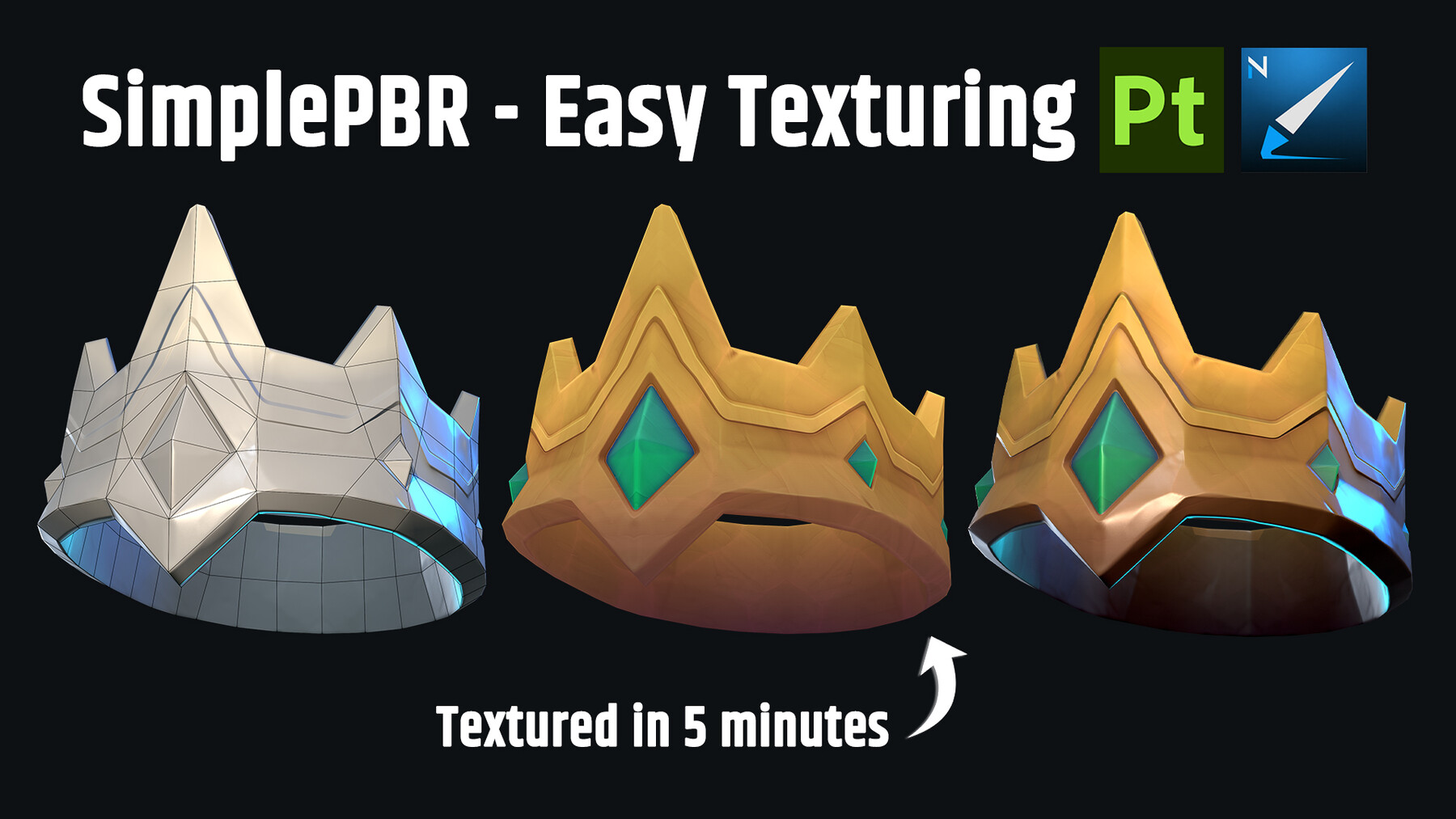


SimplePBR - Easy texturing
Create stunning texturing results on your 3D Models + speed up workflow with SimplePBR material generator 🎨
(includes famous plugin SimpleDiffuse)
SimplePBR generator was made based on PRO Artists preferences only for PBR pipeline (3D Model with baked maps)- that's why you'll get accurate result with correct values and lighting right after the application!
Features:
Base Color: Sets the main color for the surface.
Shadow Color and Spread: Sets multiplied shadow color with ability to control it.
AO Color and Spread: Sets soft ambient occlusion with ability to control it.
Curvature Opacity: Control over edges of the texture (possibility to create pleasant result for Handpaint Texturing) .
Curvature Color: Change color of curvature.
Texturizer: Add color variation, select variety of noises
Diffuse Presents:
Diffuse - Old Wood (Brown)
Diffuse - Steel (Grey Blue)
Diffuse - Gold (Yellow)
Diffuse - Bronze (Yellow)
Diffuse - Copper (Red)
Diffuse - Oxidized Copper (Light green)
Diffuse - Bone (Light Gray)
Diffuse - Human skin (Pink)
Diffuse - Orc skin (Saturated Green)
Diffuse - Jade (Green)
Diffuse - Base Rock (Dark Gray)
Diffuse - Charcoal (Light Gray)
Diffuse - Obsidian (Dark Blue)
Diffuse - Terracotta (Dark Orange)
Diffuse - Moss (Yellow Green)
Diffuse - Marble (White)
Diffuse (Texturizer ON) - Marble (Cream White)
Diffuse - Ice (Light Blue)
Diffuse - Ceramic Blue (Deep Blue)
Base Light Features:
Specular Color, Height, Rotation: Light up the surface with full control over color and position.
Specular Exponent, Number of Lights: Control over light spread and power.
Rim Light Features:
Option to create a glow from the bottom: Useful for shiny materials like crystals the presentation.
Fake Brush Strokes Features:
Enable Brush Strokes: Turns on and off the brush strokes mode.
Enable Brush Strokes FX: Turns on and off additional volume and detail and brush strokes.
Use Custom Brush Stroke: Turns on and off option to pick your brush stroke image.
Amount X, Amount Y, Scale, Scale Random: Full control over the amount and size of the brush strokes.
Rotation, Rotation Random, Normal Rotation Influence: Full control over the rotation of the brush strokes based on the 3D Model.
Detail Opacity, Mask Random: Ability to create additional "painting" information and remove certain brush strokes.
Gradient Features:
Option to push the result with 2 gradients: Dark multiplied gradient from bottom, Light gradient from the top.
Gradient Color, Power: Sets the color and contrast of both gradients.
Post Process Features:
Option to push final colors with 2 sliders: Multiply and Overlay layers.
Roughness channel: Create roughness in a few clicks
Base Roughness — 0.0
Use Roughness from diffuse — True
Include Texturizer — False
Roughness Conversion Type — Luma
Roughness from diffuse amount — 0.0
Roughness from diffuse invert — True
Diffuse Roughness Power — 0.0
Diffuse Roughness Contrast — 0.0
Metallic channel: Create metallic in a few clicks
Base Metallic: 0.0
Use metallic from diffuse: True
Include Texturizer: False
Metallic Conversion Type: Luma
Metallic from diffuse amount: 0.0
Metallic from diffuse invert: False
Diffuse Metallic Power: 0.0
Diffuse Metallic Contrast: 0.0
Emission:
Presents:
Emission - Cracked Glass (Blue)
Emission - Toxic Algae (Yellow Green)
Emission - Ghost Venis (Velvet Blue)
Emission - Blood Rune (Textured Red)
Emission - Ancient Jade (Toxic Green)
Emission - Solar Relic (Yellow Orange)
Emission - Void Crystall (Purple)
Emission - Reactor Lime (Yellow Green)
Emission features:
Use Emission - True
Emission mask invert - False
Emission Color - color
Mask power - 0.15
Mask contrast - 0.4
Mask blur - 1
Enable post process - False
Curvature boost - 0
Curvature mid level - 0.5
AO supзression - 1
Core Color - color
Core power - 0
Core contrast - 0
Enable Texturizer - False
The uniqueness of our generator is that it has initially correct settings and immediately produces great results based on your 3D model. We also do not have any unnecessary options that would overload the plugin. Enjoy it!
Software: Substance Painter.
CATEGORIES
Standard Use License
USD $39.00
License: Standard License
Stock Assets
For personal use and one commercial project (up to 2,000 sales or 20,000 views).
TutorialsOne copy to be used by a single user.
Installable ToolsOne installation by a single user.
Learn MoreFiles (2)
https://artstn.co/m/zR5p8
Copied
More by N-hance Studio


Add a tip for N-hance Studio
Tips are appreciated, but optional!
