
 Sign Up with Epic Games
#type: node
#context: sop
#internal: FENRIRSEGO::fence_generator::1.0
#tags: model, procedural, environment, fence, architecture
= Fence Generator =
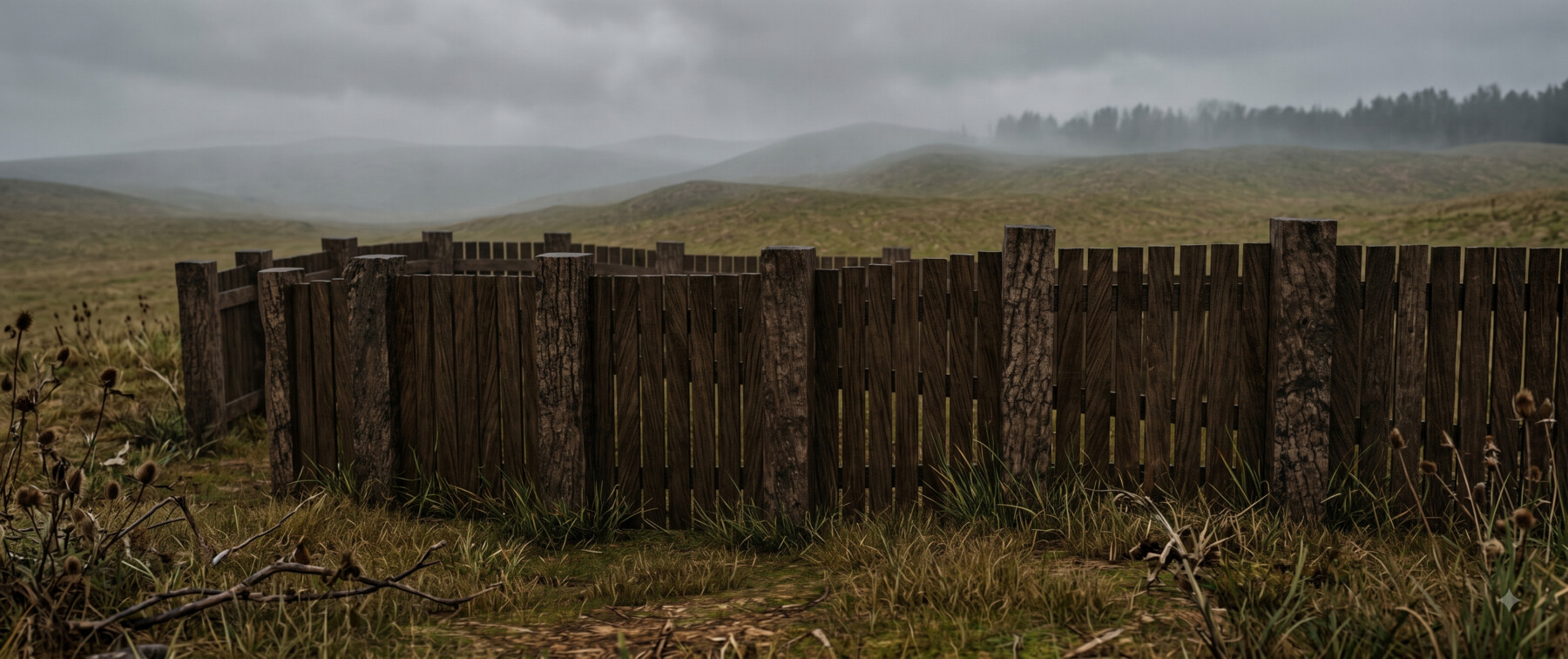
"""Builds a procedural picket fence along any curve, with terrain conforming,
custom rail profiles and adjustable wear."""
Draw or import a curve, connect it to the first input, and a complete picket
fence is generated along it — pickets, posts and horizontal rails, all
correctly oriented, including on closed loops and sharp corners.
Connect terrain geometry to the third input and the fence conforms to uneven
ground while pickets and posts stay vertical.
All sizes are in meters and match real-world proportions by default, so the
fence can be dropped straight into a scene without rescaling.
NOTE:
Parameters labelled *Adjust* are offsets applied on top of automatically
computed values. A value of 0 means "use the automatic result".
@parameters
== Main ==
Height Adjust:
Offsets the overall fence height in meters. 0 uses the automatically
computed height. All dependent values — post height, rail positions,
burial depth — follow automatically.
Bulk Adjust:
Scales the thickness of pickets, posts and rails together. 0 keeps the
default proportions. Raise for heavy timber fences, lower for thin
slatted fences.
Density Adjust:
Changes how tightly pickets are packed along the path. Positive values
add pickets, negative values spread them apart.
Wear Adjust:
Overall condition of the fence. 0 produces a new, regular fence. Higher
values progressively introduce missing pickets, random tilt and height
variation. Drives _Missing Chance_, _Height Variation_ and _Max Tilt_
on the Layout tab.
Seed:
Changes the random pattern without changing the amount of variation.
Use to reroll the look while keeping the same wear level.
Picket Top Offset:
Vertical offset of picket tops relative to post tops. Positive raises
pickets above the posts, negative lowers them below. 0 aligns them.
== Posts ==
Post Depth:
Post size along the fence direction, in meters.
Post Height:
Post height above ground, in meters. Multiplied by _Bulk Adjust_.
Post Width:
Post size across the fence, in meters.
Post Burial Depth:
How far posts extend below the ground surface. Prevents visible gaps
where the fence crosses sloped terrain.
== Pickets ==
Picket Depth:
Picket thickness along the fence direction, in meters.
Picket Height:
Picket height, in meters. Multiplied by _Bulk Adjust_.
Picket Width:
Picket width across the fence, in meters.
Picket Burial Depth:
How far pickets extend below the ground surface. Increase to close
gaps under the fence on uneven terrain, leave at 0 for a raised,
rustic look.
== Layout ==
Ray Start Height:
Height the path curve is lifted before being projected down onto the
ground geometry. Increase if the fence fails to reach tall terrain.
Only relevant when terrain is connected to the third input.
Picket Gap:
Space between neighbouring pickets, in meters.
Post Spacing:
Distance between posts, in meters. Automatically clamped so that posts
can never overlap, regardless of the value entered.
Missing Chance:
Probability that an individual picket is removed. Driven by
_Wear Adjust_.
Height Variation:
Amount of random variation in picket height. Driven by _Wear Adjust_.
Max Tilt:
Maximum random tilt applied to pickets, in degrees. Driven by
_Wear Adjust_.
== Rails ==
Rail Offset:
Horizontal offset of the rails relative to the picket face. Use to
place rails in front of, behind or flush with the pickets.
Rail Scale:
Overall thickness of the rails.
Bottom Rail Height:
Height of the lowest rail above the ground, in meters.
Rails Vertical Offset:
Moves all rails up or down together without changing their spacing.
Rail Count:
Number of horizontal rails running along the fence.
== Rail Profile ==
Consolidate Seam:
Distance used to weld the two mirrored halves of the drawn profile
together at the centre seam. Increase if the profile shows a split
down the middle, decrease if separate details merge unintentionally.
Mirror Distance:
Position of the mirror plane relative to the drawn curve. Controls the
overall width of the rail cross-section.
Snap Distance:
Points of the drawn profile closer to the mirror plane than this
distance are snapped onto it. Prevents small gaps or overlaps at the
centre of the profile.
@inputs
Fence Path:
Curve defining the path of the fence. Required. Works with open and
closed curves, and with several separate curves at once — each is
treated independently, with its own end posts and post spacing.
Rail Profile:
Optional custom cross-section for the rails. Draw an open curve
representing one half of the profile; it is mirrored, welded and swept
along the fence path. Leave unconnected to use the built-in profile.
Ground:
Optional terrain geometry. When connected, the fence is projected onto
the surface while pickets and posts remain vertical.
@related
- [Node:sop/copytopoints]
- [Node:sop/sweep]
- [Node:sop/ray]
CATEGORIES
Standard Use License
USD $15.00
License: Standard License
Stock Assets
For personal use and one commercial project (up to 2,000 sales or 20,000 views).
TutorialsOne copy to be used by a single user.
Installable ToolsOne installation by a single user.
Learn MoreFiles (1)
https://artstn.co/m/o5Wb2
Copied
Add a tip for Grotesk Fenris
Tips are appreciated, but optional!
