
 Sign Up with Epic Games

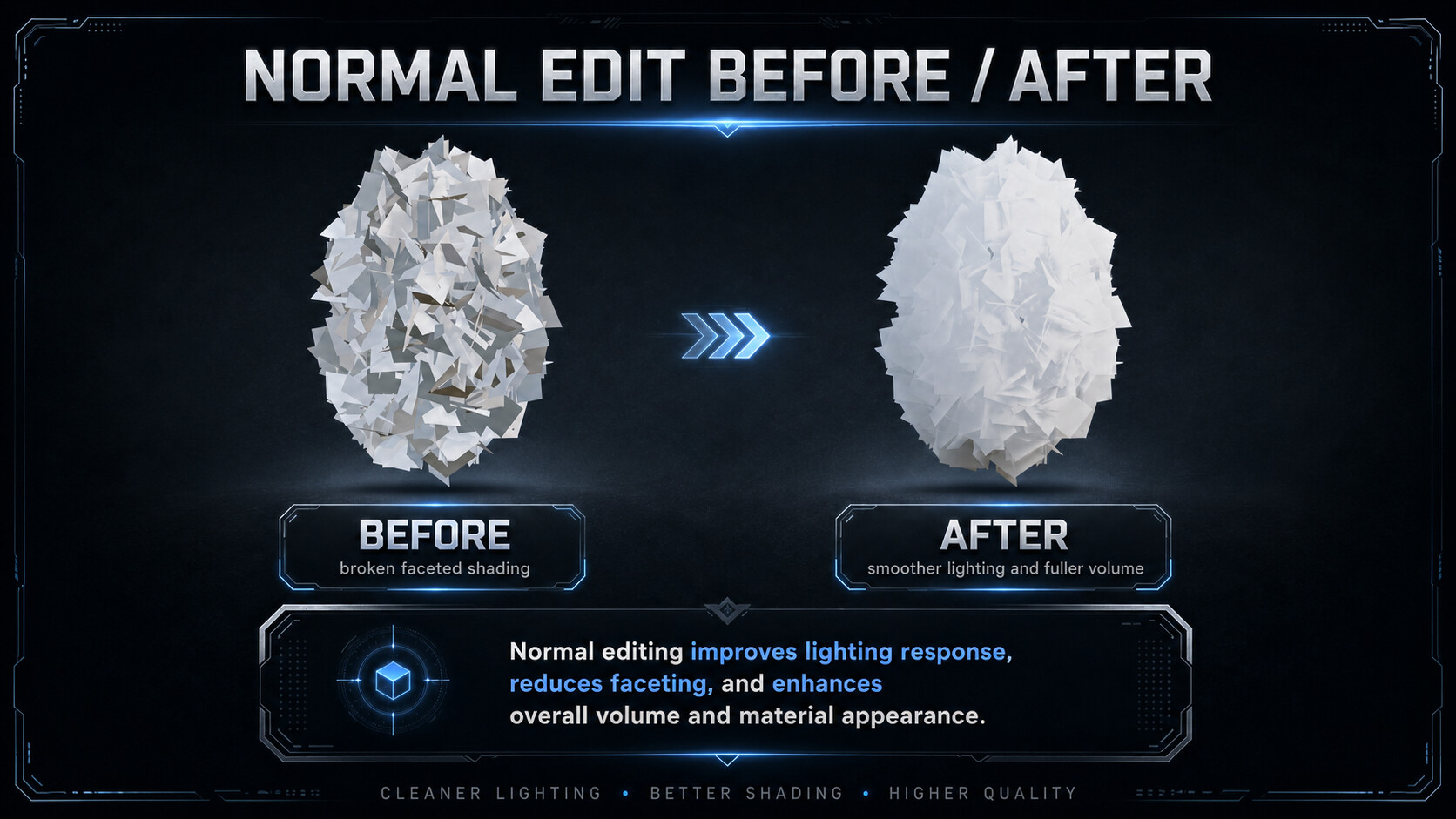

Your trees look like broken glass. Here's why.
Foliage made of intersecting cards — tree canopies, bushes, grass clumps —
shades terribly by default: every card is lit as its own flat plane, so the
whole cluster flickers between bright and dark like shattered glass.
The industry fix is well known: **rewrite the vertex normals** so the whole
cluster receives light like one smooth volume. Game studios have done it for
years with tools like Normal Thief in 3ds Max. **Foliage Normals** brings the
complete workflow to Blender — and goes further.
### Three clicks from noise to smooth
1. **Make Hull Proxy** — builds a smooth convex hull around your foliage
(wireframe display, auto-assigned as proxy)
2. **Transfer From Proxy** — samples smooth, barycentric-interpolated
normals from the proxy surface onto every vertex
3. **Add Backface Fix** — inserts a backface compensation node group into
your materials, so single-sided cards stay lit from both sides
Prefer a simpler approach? **Spherify Normals** points all normals outward
from a center in one click — object origin, bounds center, 3D cursor,
selected-vertices median, or any object (drop an Empty where you want the
light pivot).
### Features
- **Spherify** — radiate normals from a configurable center, with a Blend
slider (spherical interpolation from the original normals)
- **Proxy Transfer (Normal Thief)** — nearest-surface sampling with smooth
interpolated normals from any mesh: sphere, hull, or a custom sculpted
shell; proxy modifiers are respected
- **One-click hull proxy** — convex hull of the whole selection, ready to use
- **Backface Fix** — one button makes your materials two-sided-aware; chains
correctly after existing Normal Map setups, idempotent, and can create a
starter material for objects without one
- **Lossless Backup / Restore** — original normals are stored in a mesh
attribute that saves with your .blend; revert anytime
- **Production-ready details** — edit-mode "only selected vertices",
multi-object batches with optional shared center, correct results under
non-uniform scale, full undo + F9 redo panel
- **Fast** — NumPy-vectorized: ~120,000 vertices in under half a second
### Non-destructive to your geometry
Foliage Normals only writes custom split normals. Your topology, UVs,
weights and shape keys are untouched — and one click restores the original
normals from the built-in backup.
### Works with your export pipeline
Custom normals export with FBX/glTF as usual. In Unreal or Unity, pair them
with a two-sided foliage material (TwoSidedSign correction) — the manual
explains exactly how, with a ready-made Blender node reference.
### Compatibility
| Blender | Support |
|---------|---------|
| 4.2+ | Extension package (recommended) |
Verified on Blender 5.1. Ships with an automated test suite.
### What's in the box
- The add-on (Extension zip + legacy .py)
- Quick-start guide with the 3-click workflow
- Shader setup notes for Blender, Unreal and Unity
---
## FAQ (paste into the marketplace FAQ section)
**Q: Some cards turn black after transferring — is that a bug?**
A: No — renderers flip shading normals on backfaces of single-sided cards.
Click **Add Backface Fix** on your material and check the result in Material
Preview or Rendered mode (Solid mode ignores materials by design).
**Q: Does it modify my mesh?**
A: Only custom split normals are written. Geometry, UVs and weights are
untouched, and Backup/Restore reverts normals losslessly.
**Q: Does it work with modifiers on the proxy?**
A: Yes — the transfer samples the evaluated proxy mesh, so Subdivision,
Shrinkwrap etc. are included.
**Q: Can I use it on just part of a mesh?**
A: Yes — in edit mode the operators default to "Only Selected Vertices".
**Q: Will the normals survive export to a game engine?**
A: Yes, custom normals export via FBX/glTF. Use a two-sided foliage shader
in-engine (see the included notes).
CATEGORIES
Standard Use License
USD $2.99
License: Standard License
Stock Assets
For personal use and one commercial project (up to 2,000 sales or 20,000 views).
TutorialsOne copy to be used by a single user.
Installable ToolsOne installation by a single user.
Learn MoreFiles (1)
https://artstn.co/m/npm21
Copied
Add a tip for Haoliang Yang
Tips are appreciated, but optional!
