Sign Up with Epic Games

Update 0.3 :
- Added Gridify UV button - Select your faces, then click Gridify UV to straighten your island into a rectangle. Works only on quads.
- The auto-alignment algorithm has been revised and improved; tooltips are now displayed in the alignment settings to help you understand how it works.
- Code updated for compatibility with Maya 2027.
- Fixed a visual glitch that was causing cells to appear slightly misaligned.
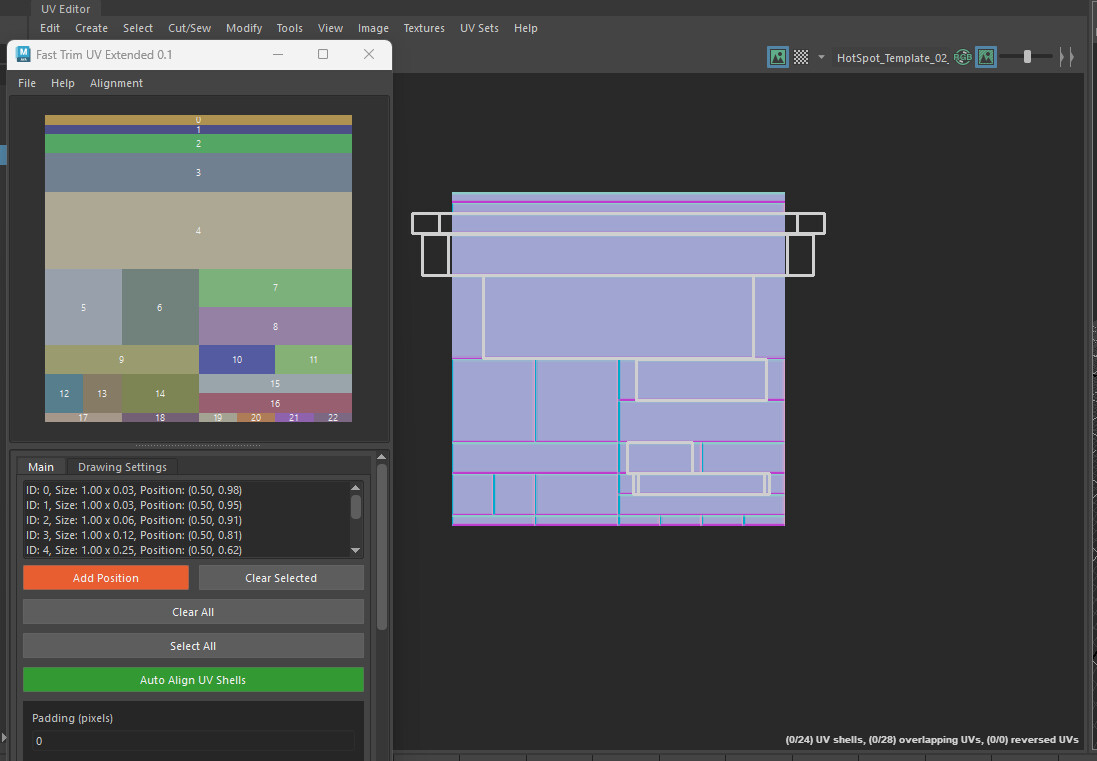
Fast Trim UV Extended is designed to help you quickly layout UVs on trimsheets or hotspot textures.
Template Creation:
Build a custom atlas template using current UV position, by using the drawing tool or by importing an ID map.Alignment:
Manually align UVs by clicking on different trims, or use the auto-align feature.
Auto-alignment will try to fit the shells to the best possible trim/cell.Texture Resolution & Padding Controls
Save & Load Configurations
INSTALLATION :
1- Place the file "FastTrimUVExtended.py" into your Maya script directory:
Windows: C:\Users\<username>\Documents\maya\<version>\scripts
2- Open the Python script editor and type the following command then press enter:
import FastTrimUVExtended
FastTrimUVExtended.create_uv_visualization_ui()
Compatibility : Maya 2022 and above.
If you encounter any bugs or have suggestions for improvements, please feel free to contact me directly on ArtStation.
CATEGORIES
Standard Use License
USD $8.00
License: Standard License
Stock Assets
For personal use and one commercial project (up to 2,000 sales or 20,000 views).
TutorialsOne copy to be used by a single user.
Installable ToolsOne installation by a single user.
Learn MoreFiles (3)
Studio License
USD $24.00
License: Extended Commercial License
Stock Assets
For use on an unlimited number of commercial projects with no limits on sales or views.
Learn MoreFiles (3)
https://artstn.co/m/m992X
Copied
Ratings & Reviews
Sort by:LikesDate
Reviews (4)
 JinnOro
00Report| Release v.0.3 | Studio License | 17 days ago
so incredibly useful
 Jinkun Chen
10Report| Release v.0.3 | Standard Use License | 11 months ago
The best maya trim plugin ever!
 Nikita Hrushevskyi
10Report| Release v.0.3 | Standard Use License | about 1 year ago
Amazing tool, extremely handy for trims layout!
 Ahmet Enes Yurdakul
10Report| Release v.0.3 | Standard Use License | over 1 year ago
Great tool!!
Filter by Rating
More by Anthony Fekih
Add a tip for Anthony Fekih
Tips are appreciated, but optional!