Sign Up with Epic Games


# Scale Normalizer
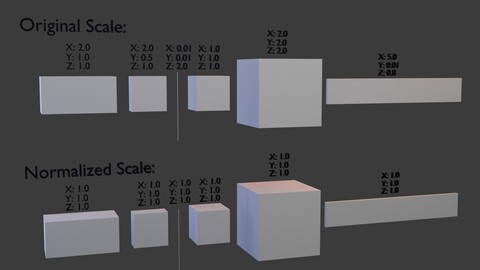
A Blender addon that automatically detects and fixes non-uniform scales in 3D models, particularly useful when importing models from other applications.
## Features
- Automatically detect objects with non-uniform scales
- Fix scale issues with multiple normalization methods
- Configurable detection threshold for precision control
- Process selected objects or entire scene
- Apply Transform method (recommended) for clean geometry
- Uniform Scale method with average, maximum, or minimum options
- One-click Auto Fix for complete workflow automation
- Reset scale functionality for quick cleanup
- Real-time feedback and object counting
- Full undo/redo support
## Installation
1. Download the addon
2. In Blender, go to Edit > Preferences > Extensions
3. Click "Install..." and select the addon zip file
4. Search for "Scale Normalizer" and activate it by clicking the checkbox
## Usage
1. Import or create objects with non-uniform scales
2. Go to the 3D View > Sidebar (N key) > Tool tab
3. Find the "Scale Normalizer" panel
4. Configure your desired options:
- Scope: Choose between "Selected Only" or "All Objects"
- Detection Threshold: Set sensitivity (0.01 recommended)
- Normalize Method: Choose "Apply Transform" (recommended) or "Uniform Scale"
5. Click "Auto Fix Scale" for automatic detection and correction
6. Alternatively, use individual operations:
- "Detect Non-Uniform Scale" to identify problematic objects
- "Normalize Scale" to fix selected objects
- "Reset Scale" to set scale to (1,1,1)
## Requirements
- Blender 4.0.0 or higher
## License
GPL-3.0-or-later
CATEGORIES
Standard Use License
Free
License: Standard License
Stock Assets
For personal use and one commercial project (up to 2,000 sales or 20,000 views).
TutorialsOne copy to be used by a single user.
Installable ToolsOne installation by a single user.
Learn MoreFiles (1)
https://artstn.co/m/ag2pr
Copied
More by Eduardo - netkingZ - Bartali

Add a tip for Eduardo - netkingZ - Bartali
Tips are appreciated, but optional!