Sign Up with Epic Games
MixamoProRetargeter - Advanced Auto-Rigging Tool for Maya

in Resources


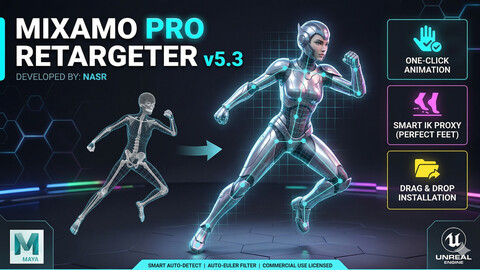
MixamoProRetargeter - The Ultimate Auto-Rigging & Retargeting Tool for Maya
Stop wasting hours on manual retargeting! MixamoProRetargeter is a custom tool designed specifically for 3D animators and technical artists to seamlessly transfer Mixamo animations to your custom character rigs in Autodesk Maya.
Key Features:
Fast & Efficient: Retarget animations with just a few clicks.
User-Friendly UI: Clean and intuitive interface built directly into Maya.
Optimized Workflow: Saves time for animators and riggers by automating the repetitive retargeting process.
Developed by: Nasr
## 🌟 Overview
Mixamo Pro Retargeter is a professional, smart automation tool for Autodesk Maya. It allows animators and 3D artists to seamlessly transfer any Mixamo animation to custom character rigs or the Unreal Engine 5 Mannequin with just one click.
Featuring a "Smart Auto-Detect" engine, a "Smart IK Proxy" system for perfect foot tracking without axis flipping, and an auto-Euler filter, this tool is designed to save you hours of manual retargeting and cleaning.
---
## 🚀 Installation (Drag & Drop)
We made the installation process as simple as possible:
1. Extract the downloaded .zip package.
2. Open Autodesk Maya.
3. Simply Drag & Drop the install.mel file directly into your Maya Viewport.
4. A success message will appear, and a new "MixamoPro" button will be added to your current Maya shelf automatically!
---
## 🎮 How to Use
1. Prepare the Scene: Import your character rig and the Mixamo .fbx animation file into the same Maya scene.
2. Launch the Tool: Click the "MixamoPro" button on your shelf.
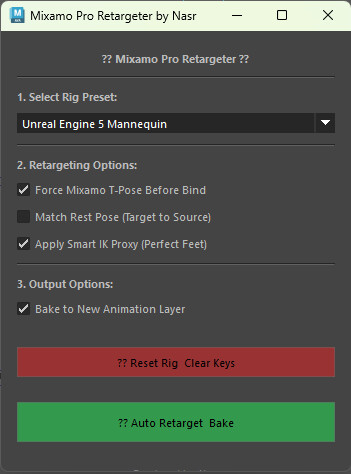
3. Select Preset: Choose "Custom Rig (Smart Auto-Detect)" or "UE5 Mannequin" depending on your rig.
4. Clean Start (Optional but Recommended): Click the red 🧹 Reset Rig & Clear Keys button to ensure your rig is clean from any previous constraints or animation bakes.
5. Retarget: Leave the default options checked (especially the IK Proxy for perfect feet matching) and click the green 🚀 Auto Retarget & Bake button.
6. Done: Wait a few seconds for the baking process to finish. Hide the original Mixamo skeleton and enjoy your perfect animation!
---
## ⚠️ Troubleshooting
- Flipping/Weird Rotations? Make sure you hit the Reset Rig button before applying a new animation.
- Controls Not Moving? Ensure your custom rig uses standard naming conventions (e.g., contains words like "Wrist", "Foot", "Spine", "Ctrl" in the controller names). The Smart Engine catches 90% of standard rigs.
---
## ⚖️ License & Terms of Use
- Single User License: This tool is licensed for use by one individual.
- Commercial Use: You are free to use this tool for both personal and commercial projects (games, films, freelance work, etc.).
- Restrictions: Reselling, redistributing, or modifying the source code to create a competing product is strictly prohibited.
Thank you for your support, and happy animating!
CATEGORIES
Standard License
USD $15.99
License: Standard License
Stock Assets
For personal use and one commercial project (up to 2,000 sales or 20,000 views).
TutorialsOne copy to be used by a single user.
Installable ToolsOne installation by a single user.
Learn MoreFor individual artists, freelancers, and personal projects. Read MoreRead Less
Files (2)
Extended Commercial License
USD $39.99
License: Extended Commercial License
Stock Assets
For use on an unlimited number of commercial projects with no limits on sales or views.
Learn MoreFor studios, companies, and teams. Allows multiple users. Read MoreRead Less
Files (2)
https://artstn.co/m/MrWOP
Copied

Add a tip for mohamed nasr
Tips are appreciated, but optional!