Sign Up with Epic Games


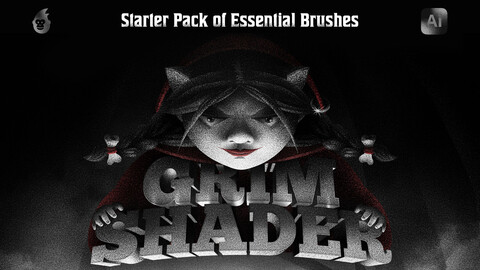
Grim Shader Brushes for Adobe Illustrator enable an artist to smoothly add a texture to an object, whether they want it subtle or intense.
It includes 10 brushes applicable in various techniques, from flat art to complex 3D illustrations, as nothing will beat them in terms of adding volume or setting the forefront, medium plan, and background inside the image.
How to install Grim Shader Brushes?
Please refer to the dedicated product guidelines page for text and video instructions.
Shader brushes appear to be one of the primary tools in digital art. They are like a graphite pencil or charcoal in the arms of an artist, allowing them ultimate freedom and precision.
Knowing that we've aimed to create a perfect collection of grainy brushes able to satisfy the needs of digital artists using different software: Procreate, Photoshop, Illustrator, Affinity Designer, and Clip Studio Paint. Another primary objective was to supply professionals with a variety of shaders that would cover multiple tasks, from basic texturing and shading to mimicking pastel effects and creating gradients.
- Grim Shader Brushes for Procreate.
- Grim Shader Brushes for Adobe Photoshop.
- Grim Shader Brushes for Affinity Designer.
- Grim Shader Brushes for Clip Studio Paint.
Art of the Grim Shaders
The grim style of the presentation was not chosen by chance. This way Olga sought to show how the brushes convey and create volume and a lighting effect in the illustration. This effect is due to the combination of subtle to dense grain textures, as well as the ability of the brushes to complement each other and create the finest gradients and transitions.
Learn more about the process from our Gallery.
CATEGORIES
Standard License
USD $18.00
License: Standard License
Stock Assets
For personal use and one commercial project (up to 2,000 sales or 20,000 views).
TutorialsOne copy to be used by a single user.
Installable ToolsOne installation by a single user.
Learn MoreFiles (1)
Extended Commercial License
USD $69.00
License: Standard License
Stock Assets
For personal use and one commercial project (up to 2,000 sales or 20,000 views).
TutorialsOne copy to be used by a single user.
Installable ToolsOne installation by a single user.
Learn MoreFiles (1)
https://artstn.co/m/BL0Na
Copied
More by Brushapes Studio
Add a tip for Brushapes Studio
Tips are appreciated, but optional!