Sign Up with Epic Games



The SB Tuner (Speed Brush Tuner) plugin is a tool designed to make incremental adjustments to brush settings in ZBrush. It provides users with buttons and sliders to easily control and fine-tune Draw Size, Z Intensity, and Focal Shift. This plugin also allows users to store their preferred increments for future sessions.
Why SB Tuner is needed?
In ZBrush, you can adjust the increment values for Draw Size and assign hotkeys through ZPlugin > Misc Utilities. However, the same functionality is not available for Z Intensity and Focal Shift, making it inconvenient to fine-tune these parameters efficiently. This plugin was created to address this limitation, allowing you to customize and control all three parameters—Draw Size, Z Intensity, and Focal Shift—with ease.
If you're interested in SB Tuner, try the free version and give it a test!!
Features
- Adjust Brush Settings: Modify brush settings incrementally using dedicated buttons.
- Customizable Increments: Set and save custom increments for each parameter.
- Persistent Settings: Save your settings to ensure they remain consistent across sessions.
Usage Instructions
*** The buttons do not have pre-assigned shortcut keys, so you should set them up manually to suit your convenience. ***
-
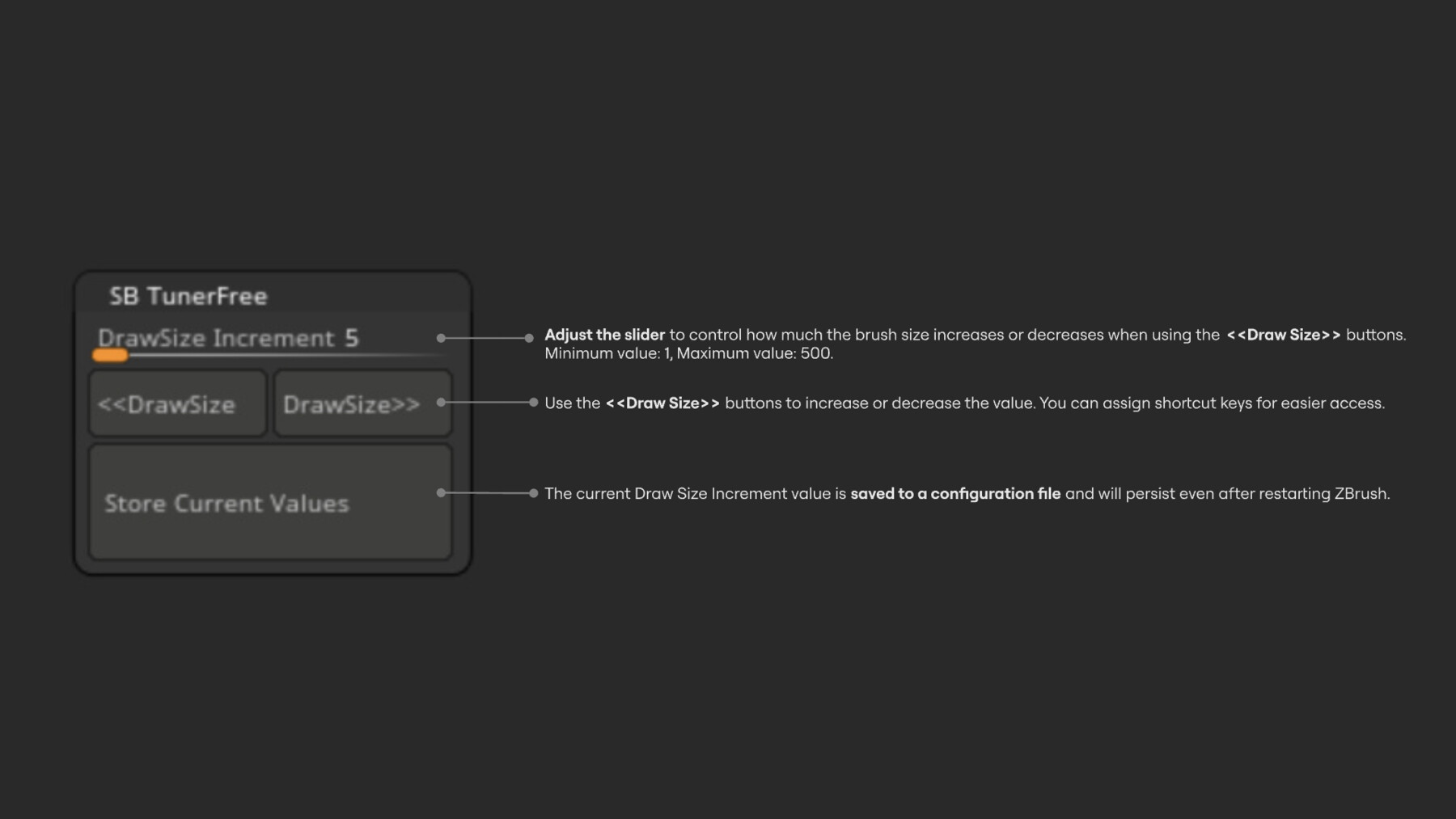
Draw Size Increment (Slider)
- Adjust the value that determines how much the brush size increases or decreases when using the <<DrawSize or DrawSize>> buttons.
-
<< DrawSize (Button)
- Decrease the brush size by the value set in the Draw Size Increment slider.
-
DrawSize >> (Button)
- Increase the brush size by the value set in the Draw Size Increment slider.
-
Z Intensity Increment (Slider)
- Adjust the value that determines how much the Z Intensity increases or decreases when using the <<Z Intensity or Z Intensity>> buttons.
-
<< Z Intensity (Button)
- Decrease the Z Intensity by the value set in the Z Intensity Increment slider.
-
Z Intensity >> (Button)
- Increase the Z Intensity by the value set in the Z Intensity Increment slider.
-
Focal Shift Increment (Slider)
- Adjust the value that determines how much the Focal Shift increases or decreases when using the <<FocalShift or FocalShift>> buttons.
-
<< FocalShift (Button)
- Decrease the Focal Shift by the value set in the Focal Shift Increment slider.
-
FocalShift >> (Button)
- Increase the Focal Shift by the value set in the Focal Shift Increment slider.
-
Store Current Values (Button)
- Save the current values of all three sliders (Draw Size Increment, Z Intensity Increment, and Focal Shift Increment) to a configuration file. The saved values will remain intact even after restarting the Zbrush.
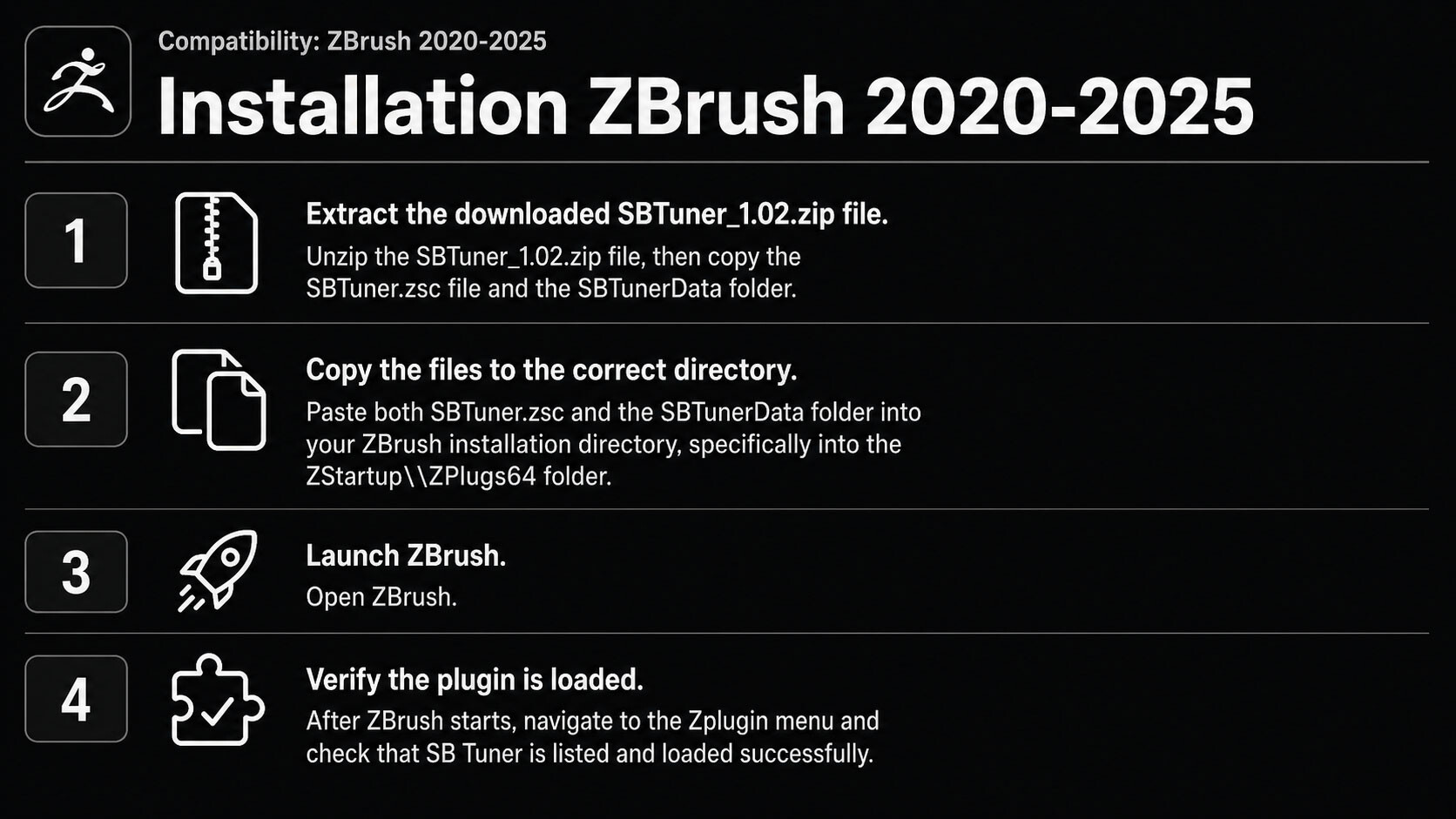
SBTuner Installation Guide - Compatibility: ZBrush 2020-2026
A. Installation ZBrush 2020-2025:
Extract the downloaded SBTuner_1.02.zip file:
Unzip the SBTuner_1.02.zip file, then copy the SBTuner.zsc file and the SBTunerData folder.Copy the files to the correct directory:
Paste both SBTuner.zsc and the SBTunerData folder into your ZBrush installation directory, specifically into the ZStartup\ZPlugs64 folder.Launch ZBrush:
Open ZBrush.Verify the plugin is loaded:
After ZBrush starts, navigate to the Zplugin menu and check that SB Tuner is listed and loaded successfully.
B. Installation ZBrush 2026:
- Launch ZBrush.
- Open Preferences > Assets Directory > Open Directory.
- In the opened folder, navigate to ZStartup > ZPlugs64.
- Extract the downloaded ZIP file.
-
Copy the plugin files into the ZPlugs64 folder.
Full version:
SBTuner.py
SBTuner/
Free version:
SBTunerFree.py
SBTunerFree/
- Restart ZBrush.
- SB Tuner will be available in the ZPlugin menu.
Release Notes
- V1.01 - Feb 8, 2025: Added a free plugin version – supports Draw Size adjustment and saving only.
- V1.02 - Mar 19, 2025 : In the previous version, the button UI was designed for a specific UI size, resulting in instances where the menu did not properly align with the UI, as identified during testing. The new version has been updated to adapt seamlessly to all UI sizes. To verify the update, version identification has been added, displaying the text "SB Tuner 1.02" upon clicking the 'Store Current Values' button.
- V1.03 - Apr 2026 : Updated SB Tuner to support ZBrush 2026 by converting the plugin from the original ZScript version to the new Python-based plugin system. This version keeps the same core controls while improving compatibility with the updated ZBrush plugin workflow.
CATEGORIES
Standard License
USD $6.00
License: Standard License
Stock Assets
For personal use and one commercial project (up to 2,000 sales or 20,000 views).
TutorialsOne copy to be used by a single user.
Installable ToolsOne installation by a single user.
Learn MoreFiles (4)
FreeSample Plugin
Free
License: Standard License
Stock Assets
For personal use and one commercial project (up to 2,000 sales or 20,000 views).
TutorialsOne copy to be used by a single user.
Installable ToolsOne installation by a single user.
Learn MoreFiles (2)
https://artstn.co/m/7gPBY
Copied

Add a tip for Danpoong Goon
Tips are appreciated, but optional!