Sign Up with Epic Games


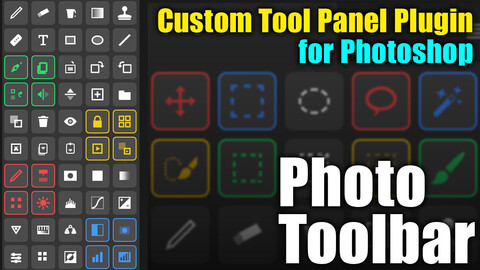
Photo Toolbar is a dedicated Photoshop plugin that allows you to create your very own customized tool panel to supercharge your design workflow.
"I want to build my own personalized tool panel..."
"I'm tired of searching for shortcuts and menus every time..."
"I want a place to keep my custom actions ready for instant execution..."
Recommended For:
• YouTubers, thumbnail designers, and daily Photoshop users.
• Doujinshi, Webtoon, or comic artists who heavily rely on custom actions and scripts.
• Creators looking to build their "ultimate workspace" and maximize their production speed.
🎥 See it in action (Demo Video):
https://x.com/ykt_create/status/2029157063423869150?s=20
– – – – – – – – – – – – – – – – – – – – – – – – – – – –
[ Key Features ]
1. Freely Arrange Your Favorite Standard Tools
Select and register "only the tools you actually use" from Photoshop's massive toolset. You can also add custom tools individually.
2. One-Click Execution for Custom Actions & Scripts
Place your daily routine "Actions" or external "Scripts" (.jsx files) directly onto the panel as clickable buttons.
3. Ultimate Customization
Change button orders intuitively via drag & drop. You can also completely customize icons and apply color-coding to group your tools visually.
4. Automatic Panel Resizing (Vertical / Horizontal Layouts)
The layout automatically adapts to your Photoshop workspace, easily switching between wide horizontal rows or tall vertical columns (single or multiple rows).
🌐 Global Multi-Language Support
Fully supports multiple languages: English, Japanese (日本語), Korean (한국어), Simplified Chinese (简体中文), and Traditional Chinese (繁體中文).
– – – – – – – – – – – – – – – – – – – – – – – – – – – –
Compatibility:
Photoshop 2022 ~ 2026
OS: Windows / macOS
※Due to file size, the initial installation process may take a little longer than usual.
– – – – – – – – – – – – – – – – – – – – – – – – – – – –
Terms of Use:
• Please use this plugin at your own risk. • Use of this plugin for any illegal acts is strictly prohibited.
• Reselling or redistributing the plugin data is prohibited.
• We are not responsible for any damages incurred, including malfunctions or data corruption.
• Not compatible with the Japanese Invoice System.
• AI tools were used in the creation of this product.
• Please purchase one copy per Adobe account.
FAQ:
Q. Filenames are garbled when I extract the ZIP file.
A. Since the files were created and compressed on a Mac, Windows users may experience character encoding issues during extraction. Please try using a different extraction software.
Q. A popup appeared, or an error occurred and the plugin won't work.
A. We do not provide individual support for environment-specific errors. Please double-check your system requirements and the usage instructions.
Q. When will there be updates?
A. Updates will be released when deemed necessary by the developer.
Update History:
CATEGORIES
Standard Use License
USD $19.99
License: Standard License
Stock Assets
For personal use and one commercial project (up to 2,000 sales or 20,000 views).
TutorialsOne copy to be used by a single user.
Installable ToolsOne installation by a single user.
Learn MoreFiles (1)
https://artstn.co/m/1KWKv
Copied
Add a tip for よね太
Tips are appreciated, but optional!