Sign Up with Epic Games
Interval Viewer - Figure Drawing App with a Built-In Timer

in Resources
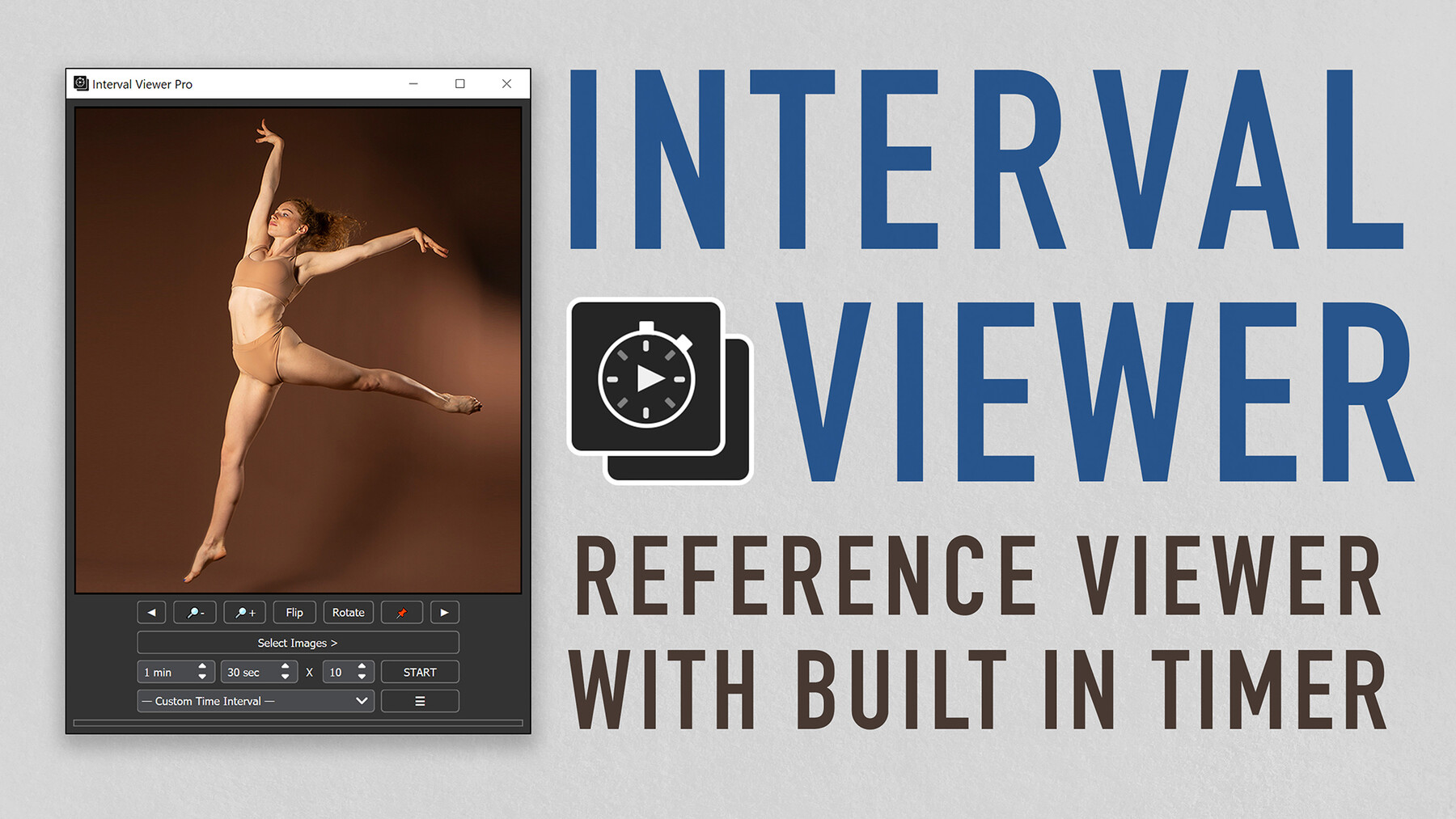



Interval Viewer PRO is here! Select your reference images, set the timer, and start drawing!
Interval Viewer is an image viewer app that lets you select your own references to use for a figure/gesture drawing session. The app is made to be easy-to-use, lightweight, and able to load 1000+ images. Perfect for studying gestures, anatomy, and doing timed photo studies.
Supports both Windows and MacOS!
PRO version includes:
All features from Beta/Free version
Improved Interface - New button layouts with added features including rotate, flip, zoom images, pause, resume, and more
Direct Drag & Drop - Skip the search option and directly drag and drop images or folders
Queue Management - Add, remove, and shuffle images with ease using the Queue panel
Presets - Customize and save presets for your favorite intervals
Bookmarks - Save your favorite directories and images for future access
Different Loading Options - Toggle the ability to include subfolders, unselected images, and more
Free Reference Pack- Sample pack with 100+ images from PoseSpace.com
Reference Pack Discount - Discount code for Grafit Studio
Life-Time Updates - Buy once and get new updates and bug fixes free for life!
BETA/FREE version includes:
Interval Timer - Set the time and amount of poses to start a drawing session
Shuffle - Toggle to shuffle or sort the images in order
Zoom - Toggle to fit images 100% to the window or to show 50%
Timer Sound - Toggle alarm sound for the timer
The reason I created this is because I've tried other apps and they either feel too clunky or did not have the features I was looking for. I'm an avid drawer, and I made this app from the ground up to suit exactly my needs. Feel free to reach out through email or DM me on my social media if you have any questions or concerns. Let me know what you think and what you'd like to see next. Post your drawings and use the hashtag #choonhachatSKETCH
-Dylan Choonhachat
Release Notes
-
Version 2.2.10 (2025/02/03):
Fixed rotation issues caused by images with incorrect metadata
Optimized the application to launch faster on MacOS
-
Version 2.2.9 (2025/02/03):
Fixed the bug that caused sub-folders to not load if there are duplicate images
-
Version 2.2.8 (2025/02/02):
Fixed the bug that prevented rearranging of images in the queue
-
Version 2.2.7 (2025/01/28):
Fixed the bug that caused bookmarks to not load properly
-
Version 2.2.6 (2025/01/27):
Added the ‘Skip’ button to reset the timer and skip to the next image
Added the ability to upload shortcuts for windows
Added the ability to drag and drop from Bookmarks to Queue
Fixed the bug that caused the app to crash when changing the sorting
Fixed the bug that caused the wrong names to show in the browse window
Fixed the bug that caused some intervals to remain in the list after deleting them
-
Version 2.2.5 (2025/01/06):
Complete rework of the app
User Interface has been simplified to be more intuitive and less cluttered
Added the ability to customize time intervals and save presets
Added the ability to rearrange images in the Queue
Added the ability to rename Bookmarks
Added Pause/Resume to the timer
Added the option to show thumbnails for images in the Queue (turn on in the settings)
Added customization to some UI elements
Fixed stability issues with timer and loading images
Fixed the bug that caused some images to remain in the queue after deleting them
Updated the Free version with the new bug fixes
-
Version 2.1.9 (2024/08/12):
The queue list now shows the current image as selected
Fixed the pin/unpin buttons showing in the wrong place on the interface
-
Version 2.1.8 (2024/08/02):
Updated the interface to be more stable
Added the ability to bookmark current image
Fixed the bug that caused the app to crash when pressing Esc
Added reference pack from PoseSpace.com
-
Version 2.1.7 (2024/07/09):
Added the option to move the main controls to the side panel
-
Version 2.1.6 (2024/06/24):
Added MacOS version.
Updated interface to make panel sizes adjustable.
-
Version 2.1.4 (2024/06/20):
Added Dark/Light themes.
Fixed the inconsistencies of the UI on different screen resolutions.
Fixed the bug that caused images to appear at lower quality.
-
Version 2.1.2 (2024/06/17):
Fixed the bug that caused the new alarm chime sound to not work.
Fixed the bug that caused timer to glitch after stopping
-
Version 2.1 (2024/06/15):
Updated the buttons and layout to be more intuitive.
Added a panel to show a list of images that have been loaded to the queue.
When loading new images, instead of clearing previously loaded images, the images are now added to the Queue.
Added the ability to detach the side panel.
Added the ability to flip and rotate the image.
Added the status bar to show remaining time for each interval.
Changed the chime sound for the timer.
Fixed the bug that caused the bookmarks to appear in random order
Fixed the bug that allowed multiple sessions to start simultaneously
Fixed the discrepancies in the queue caused by pressing cancel while loading images
Fixed the errors caused by loading unknown file types or duplicate files
-
Version 2.0 (2024/04/07):
Added the ability to drag and drop files directly to the viewer
Directory side panel has been added for easy browsing
Added bookmarks
Added the option to include subfolders when loading
Added the option to include unselected images in the same location when loading
Toggling shuffle no longer changes the current image
Starting a session no longer skips the current image
CATEGORIES
Interval Viewer PRO
USD $5.00
License: Standard License
Stock Assets
For personal use and one commercial project (up to 2,000 sales or 20,000 views).
TutorialsOne copy to be used by a single user.
Installable ToolsOne installation by a single user.
Learn MoreLatest features and updates + Sample Reference Pack & Discount Codes Read MoreRead Less
Files (6)
Interval Viewer
Free
License: Standard License
Stock Assets
For personal use and one commercial project (up to 2,000 sales or 20,000 views).
TutorialsOne copy to be used by a single user.
Installable ToolsOne installation by a single user.
Learn MoreBasic features Read MoreRead Less
Files (2)
https://artstn.co/m/qdRB8
Copied
More by Dylan Choonhachat

Add a tip for Dylan Choonhachat
Tips are appreciated, but optional!