Sign Up with Epic Games
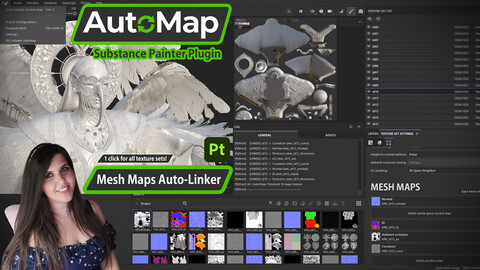
AutoMap - Mesh Maps Auto Linker [Substance Painter Plugin]

in Resources


New Substance Painter Plugin! 🎨
If you bake in Marmoset, but texture in Painter, AutoMap is your new best friend. 🤝 I’ve designed it to improve optimization in your painting workflow and freely focusing on texturing part! ✨
🎬Check AutoMap Video Tutorial: https://www.youtube.com/watch?v=iaOT_5budIw
🚀 One-Click Link: Instantly connects all externally baked maps imported in Painter project, across all texture sets.
🧠 Smart Suffix Logic: Handles prefixes (like tex_), focusing on core name and avoids false positives between similar materials.
✨✨✨ If you liked the product, don't forget to drop a review!~✨✨✨
🛠 Full Mesh Maps Support:
[TOKEN LOGIC]
• Normal: [_nm, _nrm, _normal, _n]
• AO: [_ao, _occ, _occlusion]
• ID: [_matid, _id, _objid]
• Curvature: [_curvature, _curve]
• Thickness: [_thickness, thick]
• And even : Height, Position
---------------------------------------------------------
🧩Texture/Material Matching:
[SMART MATCHING LOGIC]
The plugin uses an advanced "Suffix-End" matching logic to ensure 100% accuracy,
even with complex file names or shared prefixes (e.g. "tex_").
RULE: [Material Name]_[Suffix] must be identical for both texture and material.
For ex. (Texture Set) Material "hero_01" and its textures:
MATCHED:
- hero_01_normal.png
- hero_01_ao.tga
- hero_01_id.tif
IGNORED:
- h_01_normal.png -> Core name "h" isn't "hero"
- hero_nm_01.png -> Suffix is not at the end
- hero_01_pos.png -> "pos" is not a valid token
---------------------------------------------------------
Hope it helps!🎨
Notes: 🖋️
- Tip: After activating AutoMap in Edit Menu, click or rotate the viewport to refresh UI, in order to see all mesh maps of all texture sets applied on model.
CATEGORIES
Special Offer! Get 5% off when you buy 2 products. Get 6% off when you buy 3 or more products. Applies to all products from this seller only from USD $1.00 to USD $100.00
Standard Use License
USD $10.00
License: Standard License
Stock Assets
For personal use and one commercial project (up to 2,000 sales or 20,000 views).
TutorialsOne copy to be used by a single user.
Installable ToolsOne installation by a single user.
Learn MoreOne installation by a single user Read MoreRead Less
Files (1)
Extended Commercial License
USD $20.00
License: Extended Commercial License
Stock Assets
For use on an unlimited number of commercial projects with no limits on sales or views.
Learn MoreFor use on an unlimited number of commercial projects with no limits on sales or views Read MoreRead Less
Files (1)
https://artstn.co/m/1K0Ao
Copied
Add a tip for Alice Vescio
Tips are appreciated, but optional!