Sign Up with Epic Games

# 3D Post-it Notes
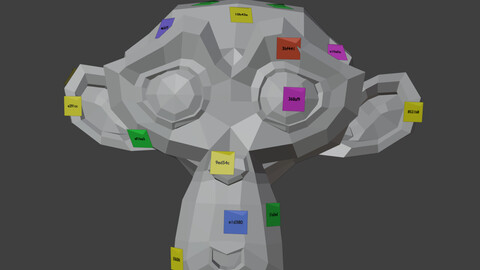
A Blender addon that allows placing sticky notes directly on 3D models surfaces. Notes can be freely positioned on any surface, are visible in the viewport but never in renders, and provide a modern intuitive interface for collaborative 3D workflows.
## Features
- **Interactive Surface Placement**: Click directly on any 3D surface to place notes with automatic normal alignment
- **Multiple Note Types**: Comment, Issue, Suggestion, and Question - each with distinct icons and default colors
- **Note Management**: Create, edit, move, archive, and delete notes with ease
- **User System**: Track note authors with customizable user colors
- **Smart Visibility**: Notes are visible in viewport but automatically hidden in renders
- **Persistent Storage**: All notes are saved automatically and persist between Blender sessions
- **Surface Alignment**: Notes automatically orient themselves to match surface normals
- **Filtering System**: Filter notes by type, status, or show/hide archived notes
- **Bulk Operations**: Delete all notes or delete by type with confirmation dialogs
## Installation
1. Download the addon as a zip file
2. In Blender, go to Edit > Preferences > Add-ons
3. Click "Install..." and select the addon zip file
4. Enable the addon by checking the box next to "3D View: 3D Post-it Notes"
## Usage
### Adding Notes
1. Open the sidebar panel in 3D View (press N if hidden)
2. Navigate to the "Notes" tab
3. Enter your note text in the Quick Create section
4. Choose note type and color (optional)
5. Click "📌 Place Note" and click on any 3D surface
### Managing Notes
- **Edit**: Click the pencil icon to modify note text, type, or color
- **Move**: Click the origin icon to reposition a note on a different surface
- **Archive**: Click the package icon to archive completed notes
- **Delete**: Click the trash icon to permanently remove a note
### User Settings
- Set your username for note attribution
- Choose a personal color that will be applied to your notes
### Visibility Controls
- Toggle all notes visibility with "Show/Hide All Notes"
- Filter notes by type using the dropdown menu
- Show or hide archived notes with the checkbox
## Note Types
- **💬 Comment**: General comments and observations (Yellow)
- **🔴 Issue**: Problems that need to be solved (Red)
- **💚 Suggestion**: Improvement suggestions (Green)
- **🔵 Question**: Questions requiring answers (Blue)
## Requirements
- Blender 4.4.0 or higher
## Known Limitations
- Notes are viewport-only and cannot be rendered
- Text displayed on notes is limited to the 6-character ID for clarity
- Notes require a surface to attach to (cannot be placed in empty space)
## License
GPL-3.0-or-later
CATEGORIES
Standard Use License
USD $4.99
License: Standard License
Stock Assets
For personal use and one commercial project (up to 2,000 sales or 20,000 views).
TutorialsOne copy to be used by a single user.
Installable ToolsOne installation by a single user.
Learn MoreFiles (1)
https://artstn.co/m/8GjGy
Copied
More by Eduardo - netkingZ - Bartali
Add a tip for Eduardo - netkingZ - Bartali
Tips are appreciated, but optional!