Sign Up with Epic Games
REQUIRES THE FOLLOWING SCRIPTS:
Machin3Tools, Maxivz's Interactive Tools (Links provided in installation document)
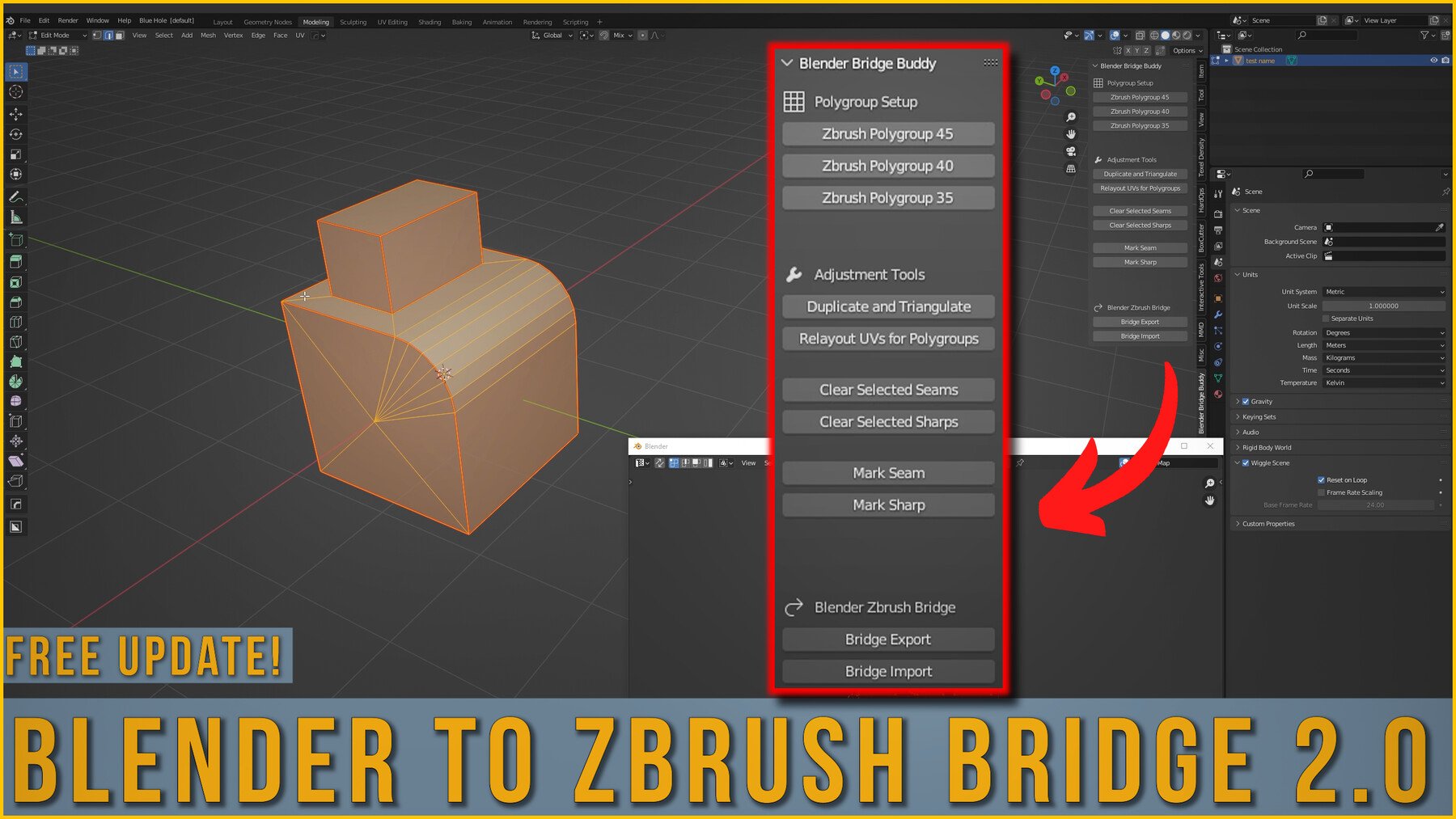
This script set allows you to send files between Blender and ZBrush with only a few clicks. No more naming temporary files, or digging through menus. Dramatically speed up your workflow with this Blender Zbrush Bridge.
Version 2.0 Notes:
A support menu has been added, allowing you to quickly set up polygroups before exporting to Zbrush.
Files export/import as FBX
Renaming and scale issues have been fixed
Select multiple objects before exporting and have them automatically broken into subtools within Zbrush
Installation video included
Release Notes
A version of the bridge for Blender 4.0 added
NOTE: The Triangulate and Duplicate button currently doesn't work with the new update
CATEGORIES
Individual
USD $3.99
License: Standard License
Stock Assets
For personal use and one commercial project (up to 2,000 sales or 20,000 views).
TutorialsOne copy to be used by a single user.
Installable ToolsOne installation by a single user.
Learn MoreIndividual user license Read MoreRead Less
Files (3)
Studio
USD $10.00
License: Extended Commercial License
Stock Assets
For use on an unlimited number of commercial projects with no limits on sales or views.
Learn MoreStudio License Read MoreRead Less
Files (3)
https://artstn.co/m/OyXKp
Copied
Ratings & Reviews
Sort by:LikesDate
Reviews (23)
 Davi Amancio
10Report| Release v.3.0 | Individual | 7 months ago
This thing renamed all my files in blender and wasn't able to export multiple assets at once. Apparently hasn't been updated in ages, either. Very cool
 Marek Rogala
00Report| Release v.3.0 | Individual | 9 months ago
Huge time-saver.
 Maksim Shniak
00Report| Release v.3.0 | Individual | 11 months ago
Hi! Really love your plugin, thanks a lot! But I have two quqastions:
1. Why after importing my object has thr name sort of "BlenderBridge.022"? Can you fix it?
2.Is it possible to transfer creases from Blender to Zbrush, and from Zbrush to Blender. In the past I used some plugin for Maya and its tranfer creases from Maya to Zbrush in fbx format.
Thanks in adwance)
 Phil Mehr
10Report| Release v.3.0 | Individual | almost 2 years ago
Great addon and does the job, better than GoB in my opinion. The only thing I'd ask Dylan is, could you please make it so the OBJ export/Import version doesn't rename all the blender meshes to 'BlenderBridge01,02 etc?' I know we can use the FBX version instead but I like having less clicks. Great work either way
 Sandra Castro
00Report| Release v.3.0 | Individual | almost 2 years ago
I was looking for a replacement that allows the same workflow from the radio tutorial by Simon Fuchs minus maya and this plugin is the solution, what a godsend, I only kept using maya cuz i loved that workflow but no more, great work man
Edit: I lowered the score cuz in order to make this work like i was planning to you need to manually triangulate the mesh in blender, there's no way to automatically do this upon export so it takes longer
 OLga Shell
00Report| Release v.3.0 | Individual | about 2 years ago
Thank you!
 Brad
Brad00Report| Release v.3.0 | Individual | about 2 years ago
Perfect for duel Blender to Zbrush users. Once all set up it runs buttery smooth! A+++ addon!
 Arsenii Sutula
00Report| Release v.3.0 | Individual | over 2 years ago
great product thanks to the developer
 知寒
知寒00Report| Release v.3.0 | Individual | over 2 years ago
A very good plug-in, but I have to raise some questions. fbx import and export cannot directly replace the model with the same name, which is very confusing. Because most of our work is like this, adding subdivisions and sculpted models in ZBrush requires importing the lowest level model into Blender or editing or unfolding UVs, and then importing it back to ZBrush to replace the lowest level and retain the subdivisions, if it is only a single model Mutual guidance does not make any sense. In addition, when importing a certain software, this plug-in can only create a new tool (in blender, it directly creates a new model) and cannot directly replace the original model, which is confusing.
 Rost Sova
10Report| Release v.3.0 | Individual | almost 3 years ago
Super
Filter by Rating
Add a tip for Dylan Abernethy
Tips are appreciated, but optional!